











Key Features
Everything you need for Display Control
Brightness Control
Volume Control
Input Source Switching
Multi-Monitor Support
Screenshots
See it in action
About This App
DisplayControl
Take full control of your external monitors — right from your Mac's menu bar.
DisplayControl is a lightweight macOS utility that lets you adjust brightness, volume, and input source on any external monitor without ever touching its physical buttons. It communicates directly with your display's hardware using the industry-standard DDC/CI protocol, giving you instant, precise control over every connected screen.
Key Features
Brightness Control
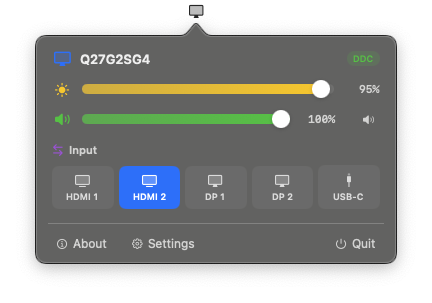
Adjust your monitor's hardware brightness with a smooth, natural-feeling slider. DisplayControl uses a perceptual brightness curve so changes feel consistent across the entire range — the jump from 20% to 40% looks the same as 60% to 80%. At the very bottom of the range, software gamma dimming kicks in for a seamless fade to true black that goes beyond what your monitor's firmware supports.
Volume Control
Control your monitor's built-in speakers directly from your Mac. Slide to adjust or mute with a single click — no more fumbling with tiny buttons on the back of your screen.
Input Source Switching
Switch between HDMI, DisplayPort, USB-C, and other inputs with one click. DisplayControl reads the currently active input from your monitor and highlights it, so you always know which source is selected. Perfect for setups where you share a monitor between a Mac and a PC, a work laptop and a personal machine, or a game console.
Keyboard Media Keys
Your Mac's brightness and volume keys work with your external monitor out of the box. In multi-monitor setups, the keyboard controls target whichever display your mouse cursor is on.
Multi-Monitor Support
Connect as many external displays as you like. Each monitor gets its own independent set of controls in the popover — brightness, volume, and input source, all individually adjustable. Monitors are automatically detected when plugged in and removed when disconnected.
On-Screen Display
When you adjust brightness or volume with keyboard keys, a native macOS OSD appears on the target display — the same style you see when adjusting your MacBook's built-in screen. A custom fallback OSD is used on systems where the native overlay isn't available.
Auto-Updates
DisplayControl checks for updates automatically using Sparkle, so you're always running the latest version. You can also check manually from Settings or the right-click menu at any time.
How It Works
DisplayControl uses the DDC/CI protocol (Display Data Channel Command Interface) to send commands directly to your monitor's firmware over its video cable. This is the same protocol your monitor uses internally — it's not a software overlay or gamma hack. When you move the brightness slider, your monitor's actual backlight changes. When you switch inputs, your monitor physically switches its video source.
The app runs entirely in your menu bar. Click the icon to open the control popover, or right-click for quick access to settings, updates, and more. There's no dock icon, no clutter — just a clean, focused tool that stays out of your way until you need it.
System Requirements
- macOS 13.0 (Ventura) or later
- Apple Silicon or Intel Mac
- External monitor connected via HDMI, DisplayPort, or USB-C with DDC/CI support (most modern monitors)
Compatibility
DisplayControl works with the vast majority of external monitors from all major manufacturers including Dell, LG, Samsung, BenQ, ASUS, Acer, Philips, HP, NEC, and many more. Any monitor that supports the DDC/CI standard over HDMI, DisplayPort, or USB-C should work.
Note: Apple displays (Studio Display, Pro Display XDR) use a proprietary protocol and are controlled natively by macOS — DisplayControl focuses on third-party monitors where macOS provides no built-in controls.
Built for Both Apple Silicon and Intel
DisplayControl ships as a universal binary that runs natively on both Apple Silicon (M1, M2, M3, M4 and beyond) and Intel Macs. Each architecture uses a purpose-built I2C transport layer optimised for its hardware, ensuring reliable communication with your displays regardless of which Mac you're running.